 THE BARATELLI INSTITUTE
· Mentoring at Scale
THE BARATELLI INSTITUTE
· Mentoring at Scale
THE BARATELLI INSTITUTE
· Mentoring at Scale
THE BARATELLI INSTITUTE
· Mentoring at Scale
A QuickBooks alternative: every company in one database, with consolidating and consolidated financial statements produced in the program — and the treasure assets, with their photographs, carried in registers tied to the ledger.
It was built because ordinary accounting software is a collection of separate databases that will not consolidate, and because a family office has to account for its treasure assets as carefully as its trial balance. Bankable holds every operating company, property entity and trust in one database and consolidates them with intercompany eliminations, and it carries real estate, art, wine, jewelry, vehicles, collectibles and private fund commitments in registers tied to the ledger. Every document an organization needs to keep — governance, tax, estate, insurance, appraisals, leases and loan agreements — is filed in the same place as the books it belongs to. Free, from the Baratelli Institute. It runs in any browser with no account and no installation, and the books stay on the device.
Underneath all of it, it keeps the books anyone would expect — invoices, bills, banking and reconciliation, inventory, payroll entries, budgets and financial statements. Then it does the work that bookkeeping software leaves to spreadsheets: the consolidation, the registers, the schedules a lender asks for, and a current and deferred tax provision.
Nothing has to be set up to see what the program does. It opens on a working business, and one button away is a working family office. Both are made up, both are complete, and every screen in the program has something in it — so the consolidation, the registers and the lender schedules can be read rather than taken on trust.
Neither sample leaves the device, and nothing is sent to the Institute. When you start your own books, the sample is removed.
A wholesale distributor and a property company, kept as two sets of books in one file and combined on one screen. Four months of real activity is posted: invoices and customer payments, bills and vendor credits, payroll entries, bank activity with a completed reconciliation, inventory with a physical count, a loan with covenant tests, and rent between the two companies that has to be eliminated when they are read together.
It is the set of books to open first if what you keep is a business. Worth looking at, in this order: Home for the month as it stands, Reports for the balance sheet and income statement of both companies combined, Loans and planning › Loan readiness for what a lender checks, and Banking › Reconcile for a month already tied out.
This sample carries only the current year, so the lending screens have little history to work with. The family office sample’s copy of Riverbend Supply has three years, a term loan and guarantors, and is the better one for the borrowing base and the SBA package.
Open the business sampleIt loads on its own. No account, no installation.
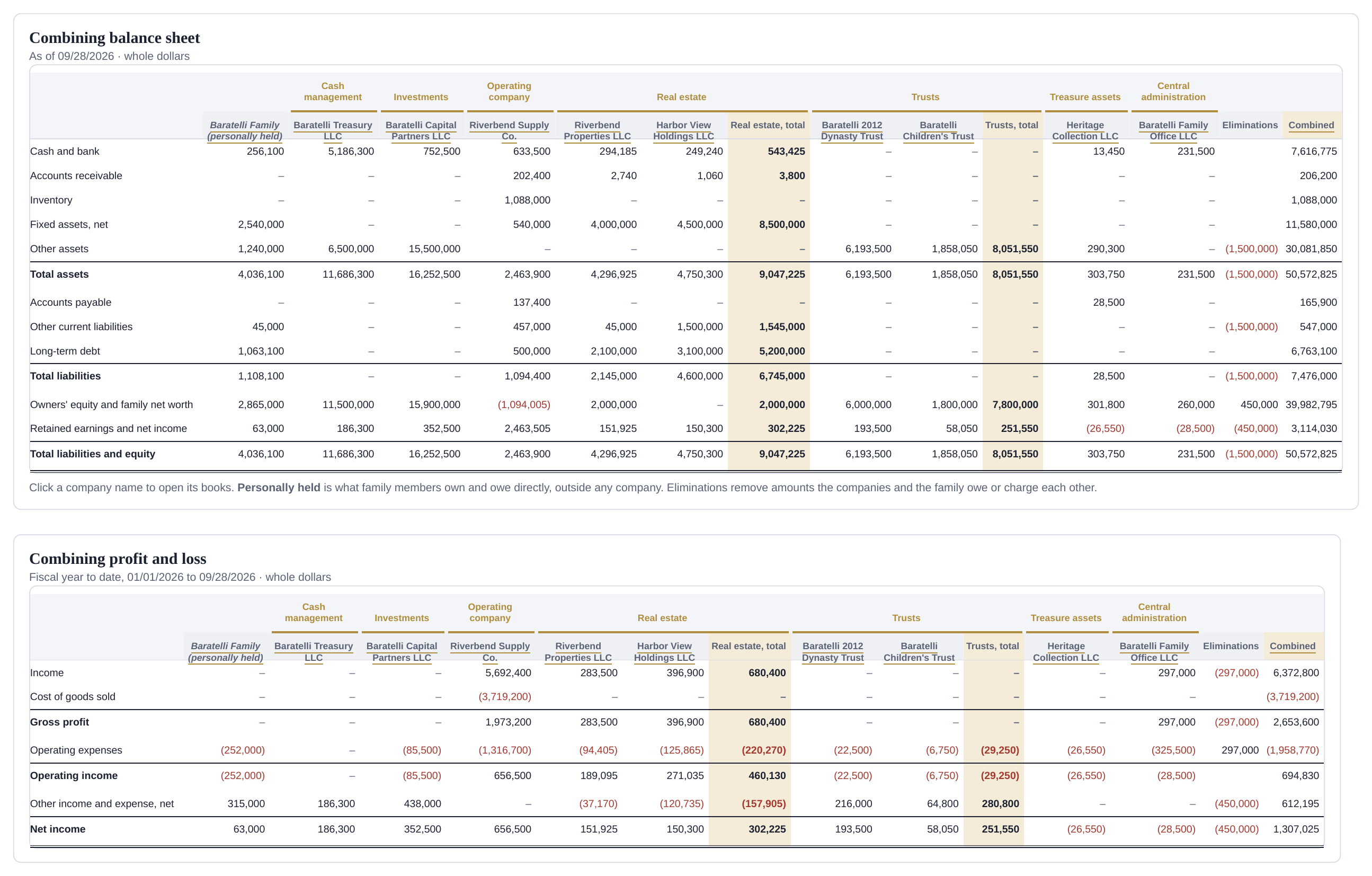
Ten sets of books in one database: what the family holds personally, Baratelli Treasury LLC, Baratelli Capital Partners LLC, Riverbend Supply Co., Riverbend Properties LLC, Harbor View Holdings LLC, the Baratelli 2012 Dynasty Trust, the Baratelli Children’s Trust, Heritage Collection LLC and Baratelli Family Office LLC. They consolidate on one screen, with intercompany balances eliminated and each company at its ownership percentage.
This is the sample that shows the part ordinary accounting software has no place for. Real estate and Treasure assets are two registers on the left, the property on one screen and the art, the jewelry and watches, the wine, the collector cars and the rest of the collection on the other — each item carrying uploaded photographs at full quality, provenance, appraisal dates, insurance and location, at cost and at fair market value, tied back to the ledger. Alongside it: Private funds with commitments, capital calls, distributions and NAV; the K-1 tracker; the Family office statement and net worth by member with look-through ownership through the trusts; the estate inventory; the Advisory team by role with fees; the Rent roll; and folders holding the governance, tax, estate, insurance and appraisal documents beside the books they belong to.
To open it: start the program, then on Home choose Explore a sample family office. One button returns you to the business sample.
Open it, then choose the family officeThe same file holds both. Switching between them changes nothing on the device.
Most small businesses keep their books in one program and then rebuild them somewhere else whenever somebody outside needs to read them. The loan package is a spreadsheet. The borrowing base certificate is a spreadsheet. The family's net worth by member is a spreadsheet, and so is the estate inventory, and so is the schedule the accountant asks for in March.
Baratelli Bankable removes that second step. The same entries that produce the trial balance also produce the loan readiness checklist, the SBA borrowing capacity and the loan package as one PDF, the collateral schedule with advance rates, the quarterly covenant certificate, the consolidated statements for ten entities with intercompany eliminations, and the family office statement at cost and at fair market value with look-through ownership through trusts. Nothing is re-keyed, so nothing disagrees.
Baratelli Bankable is competing on the bookkeeping itself. QuickBooks keeps one company's books well, and the editions a small business actually buys — QuickBooks Online and QuickBooks Desktop — keep one company per company file. An organization with a dozen operating companies, property entities and trusts does not have one company's books to keep; it has all of them, and it has to see them added together. Intuit does sell that: Desktop Enterprise Accountant can combine standard reports across company files, which produces a spreadsheet and asks that the charts of accounts match, and Intuit Enterprise Suite does real multi-entity consolidation with intercompany eliminations. Both sit above the small-business tier and are priced there. The point of the table below is not that consolidation is unavailable anywhere in the Intuit line — it is available — but what it costs to reach it, and what a family holding company gets at that price. This holds every entity in one database, consolidates them with intercompany eliminations in the program, and carries the real estate and treasure assets, with their photographs, in registers tied to the ledger. Because the books are complete, the schedules that make financing easier come out of the same entries rather than being assembled afterwards.
Each row below is a screen in the program, not a roadmap item.
| Baratelli Bankable | What it does | In QuickBooks |
|---|---|---|
| For the family office | ||
| Every company in one file | Operating companies, property companies, trusts and what the family holds personally, combined with intercompany eliminations. | One company per company file; combining requires Desktop Enterprise Accountant (reports only, no eliminations) or Intuit Enterprise Suite |
| Real estate and Treasure assets registers | Two registers — the property on one, the art, wine, jewelry and watches, cars and collectibles on the other — with photographs, provenance, appraisals and fair market value, tied to the books. | Not built in |
| Photographs, uploaded and kept with the books | Pictures upload onto any holding, inventory item or fixed asset, several at a time and at full quality, each with its own caption and one of them the cover — and print as a photo inventory, a photo catalog and a photo register. Receipts and invoices can be photographed on a phone or dragged in from a computer and attached to the entry they support. | Receipt capture only |
| Family office statement and net worth by member | At historical cost and at fair market value, with look-through ownership through trusts. | Not built in |
| Estate inventory | Everything the family owns, by who is to receive it and how it passes. | Not built in |
| Private funds and K-1 tracker | Commitments, capital calls, distributions, NAV and returns, and every K-1 expected. | Not built in |
| Family office records and advisory team | Folders for governance, taxes, estate planning, investments, insurance, staff and aircraft — and the advisors by role with their fees. | Not built in |
| For the lender | ||
| Loan readiness checklist | What a lender checks first, item by item, with the next step for each. | Not built in |
| Underwriting clean-up | Finds loan payments expensed, loan proceeds and transfers counted as income, and the other misclassifications that distort a lender's schedules — with the effect on EBITDA. | Not built in |
| SBA borrowing capacity and loan package | How much the business can borrow, and the package in one PDF: personal financial statements, debt schedule, sources and uses, projections. | Not built in |
| Borrowing base and compliance certificates | The monthly borrowing base for a line of credit and the quarterly covenant certificate, signed and ready to send. | Not built in |
| Collateral schedule and availability | Every asset at value, advance rate, what is already loaned against it and what is left to borrow. | Not built in |
| Income tax provision | Current and deferred taxes under ASC 740 with the full schedule, the rate reconciliation and the entry that books it. | Not built in |
| Loans with collateral and covenants | Escrow, balloons, guarantors and covenant tests every quarter, with warnings before a breach. | Not built in |
| For the owner | ||
| Rent roll | Units, leases, deposits and past-due tenants, agreeing with the books. | Not built in |
| Free, and the data stays yours | No subscription. The books stay on the device or in a file of your own, encrypted if you choose. | Monthly subscription; data held in Intuit's cloud (Online) |
| Moves both ways | Imports from QuickBooks, several companies at once, and exports back for a CPA who uses it. | — |
The comparison is with QuickBooks Online and QuickBooks Desktop as sold to small businesses, without add-on apps, and the product line was read on September 28, 2026 — which is the date every claim in this table should be held to, because Intuit ships changes continuously. “Not built in” means not built into those two editions. Several of these capabilities do exist higher in the Intuit line: Desktop Enterprise Accountant combines standard reports across company files, and Intuit Enterprise Suite, Intuit's ERP-tier product, does multi-entity consolidation with intercompany eliminations, a shared chart of accounts and intercompany journal entries. An organization already paying for that tier should compare against it rather than against this table. QuickBooks and Intuit Enterprise Suite are trademarks of Intuit Inc. Baratelli Bankable is not affiliated with, endorsed by, or a product of Intuit.
All of it is free, and all of it describes the program that is actually shipping rather than a forthcoming one.
| Document | Length | What it is for |
|---|---|---|
| At a Glance | 2 pages | The one-page summary and the feature comparison above, in a form that can be handed to somebody or printed for a meeting. |
| User Guide, Volume 1 — Business and Lending | 151 pages | Every screen on the business and lending side, explained. |
| User Guide, Volume 2 — Family Office | 24 pages | Every screen on the family office side: entities, holdings registers, members and ownership, private funds, the estate inventory. |
| In the Classroom — on request | 16 pages | The faculty guide: why a real system, the topic map, course setup, the Maple Street assignment, the course map, the grading rubric, and the questions faculty ask. It prints the completed statements and the rubric, so it is sent to faculty rather than published. Request it from an institutional address and name the course. |
| Accounting Treatments and Limitations | 6 pages | The faculty appendix: how the program accounts for each area and exactly where it simplifies, with a teaching point for each. |
| Pilot Kit | 8 pages | What a one-term classroom pilot involves, with the feedback questions. |
| Student Kit | Archive | What a student needs: the Maple Street starter company, ready to restore into the program, and the accounting treatments appendix. No answer keys. |
| Instructor Kit — on request | Archive | The faculty guide, both answer keys, and four sample submissions for trying the grading tool. Not published, so that the keys are not sitting at an address a student can find. Request it from an institutional address and name the course. |
Page counts measured from the shipped PDFs on September 27, 2026. Every document here can be downloaded and kept; the program itself is run from this site rather than distributed, for the reason given further down. Two features do need a connection the first time they are used — reading an Excel file and reading text from a scanned image — and the program says so plainly when it cannot reach them. The bookkeeping itself does not: once the page has loaded, entering and posting works with the connection gone.
The books are kept in the browser on the machine where they are entered, and they can be saved out at any time as one small file. There is no account to create and no server holding a copy. Nothing is uploaded to the Institute.
That cuts both ways, and it matters: clearing browser data erases books that have not been saved out. Use Download books file regularly and keep the file somewhere backed up, exactly as you would a spreadsheet. The file can be encrypted if you choose.
The program itself works the other way round, and on purpose: it stays on the Institute’s site and is not handed out as a copy to keep. It is new, it is in a testing phase, and corrections are going in constantly. A copy saved to a desktop would be frozen at the day it was saved and would carry defects that this one no longer has. Opening it here means always working on the corrected version. The books are yours and travel with you; the program stays where it can be fixed.
A lender can host its own copy. Members then see Offered by the institution's name, the institution appears on the cover of the SBA loan package their member produces, and a Send to button carrying the loan officer's own name — Send to Business Lending Team, in the configuration the kit ships as an example — opens an email to that contact with the package attached. A logo can be included.
It takes one small configuration file and no code. The point is not the branding; it is that a member arrives at the loan officer with a clean set of books and the schedules already prepared.
Baratelli Bankable is new. It has been tested against its own figures and screens with automated checks before each release, and it has been through several structured reviews — but it has not yet carried an organization through a full year of its own books, or been run by a real instructor with a real section for a real term, and the Institute is not going to describe it as though it has.
What those reviews were, stated exactly, because the wording matters: they were conducted by AI reviewers briefed to read the program cold in a named professional seat — a practicing CPA, a security reviewer, a lender, a classroom instructor, a family office controller, a bookkeeper switching from QuickBooks — and not by the practitioners themselves. That is a real instrument and it found real defects, and it is not the same thing as a professional review. The terms page says the same. The most recent of these, on September 28, 2026, ran eight seats and returned a list this page has not finished working through.
The earlier reviews produced a list of named defects and several releases worked through it — owner-only restore that preserves users and the audit trail, approval history kept through edits, cash flow classified by account role with noncash disclosures, deferred taxes as noncurrent, the family fund double count removed, a Principles mode with closing entries and a post-closing trial balance, the grading tool with its CSV export, lending-ready and family samples, and the depth items.
The faculty appendix, Accounting Treatments and Limitations, states how the program accounts for each area and where it simplifies, with a teaching point for each — so the simplifications can be taught as limitations until they are built. An error a student can find and explain is a better exercise than a system that never breaks, so long as the limitation is written down.
The next step is the one the Institute has not taken yet: a real pilot with two or three faculty over one term. The Pilot Kit holds the feedback questions for it. Anyone willing to run that pilot, or to break the program and say where it broke, is exactly who this page is written for.
Writing a journal entry on paper is half the lesson. T accounts teach the shape of a debit and a credit, and they teach it well. What they cannot show a student is what happens next: the entry posts to the ledger, moves the subledgers, appears in the trial balance and the statements, is locked by a closed period, and leaves an audit trail. Baratelli Bankable lets a class do both halves — and the second half is where the students who understand the mechanics separate from the students who have memorized a T.
It is free for every student, needs no installation and no student accounts, and runs on Windows, Mac and Chromebooks. Each student's books live in their own browser and in the one small file they hand in. Nothing is sent to the Institute, which is a real advantage where student records are concerned.
The totals line reads In balance as the student types. An unbalanced entry does not go in, so the balance sheet cannot fail to balance — and a student who wants to know why has to find their own error.
The general ledger, trial balance, balance sheet and income statement update the moment an entry is saved. Students stop typing statements and start reading them.
A journal entry straight to Accounts Receivable draws a warning: the customer aging will no longer agree with the balance sheet. That warning is the best opening there is for the lesson on why businesses use invoices and payments rather than journal entries for customers and vendors.
Closing a month locks it. Every change is in the audit trail with the time it was made. Reconciliations are saved, and a reconciled entry that changes later is flagged.
A receipt, invoice or bank statement attaches to the transaction it supports, so tracing and vouching can be done on the students' own work. On a phone the camera is one of the choices; on a computer the file can be dragged onto the entry.
Photographs upload onto a holding, an inventory item or a fixed asset — the front, back and signature of a painting, the exterior and the rooms of a building, the serial plate of a machine. Each keeps its caption, the first is the cover, and the register prints as a photo inventory. They are stored with the books, so they travel in the backup file.
The statement of cash flows, indirect and direct, reconciles to the bank. The balance sheet balances because the system cannot post an unbalanced entry.
The middle column is the actual menu path, so an assignment can name it.
| Topic | Where in Baratelli Bankable | What students learn by doing it |
|---|---|---|
| Journal entries | Record › Journal entry | Debits and credits, entry numbers, memos; the entry must balance to save |
| Posting and the ledger | Reports › General ledger, Journal | Each entry in each account, with running balances |
| Trial balance | Reports › Trial balance | Proving the ledger before statements; finding errors |
| Adjusting entries | Journal entry with Adjusting entry (AJE) ticked; Reports › Adjusting entries | Prepaids, accruals, depreciation, deferred revenue; the AJE listing |
| Financial statements | Reports › Profit and loss, Balance sheet, Statement of owner's equity | How the adjusted trial balance becomes the statements |
| Cash flows | Reports › Cash flow (indirect) and (direct) | Both methods, each tied to the bank, ending in free cash flow |
| Receivables and payables | Invoice, Receive payment, Bill, Pay bills; A/R and A/P aging | Subledgers and the control accounts they support |
| Bank reconciliation | Banking › Reconcile | Outstanding checks, deposits in transit, bank fees |
| Closing entries | Accountant › Closing entries; Reports › Post-closing trial balance | Closing revenues, expenses and drawings through Income Summary to capital; only permanent accounts remain |
| Closing the period | Month-end close; the closing date | Locking a period; why prior periods stay closed |
| Inventory | Products and services; bills and invoices with items; Physical count | Perpetual inventory at average cost; cost of goods sold; count differences and shrinkage |
| Cost accounting | Bill of materials; Build products; Production and variances | Product cost from materials, labor and overhead; standard costs and variances |
| Fixed assets | Fixed assets | Depreciation schedules, book and tax; disposals and gains |
| Payroll entries | Payroll import | Wages, withholding and employer taxes as a journal entry |
| Accrual and cash basis | Reports, Basis: Accrual or Cash | The same books both ways |
| Consolidations | Several companies; Consolidating reports | Intercompany accounts and eliminations |
| Analysis | Ratios and trends; EBITDA and SDE; Loan readiness | How lenders and buyers read the statements |
| Internal control | Users and security; Bill approvals; Audit trail | Segregation of duties; approvals; the audit trail |
Create the practice company and choose the Classroom industry — a textbook chart of accounts with Supplies, Prepaid Insurance, Salaries and Wages Payable, Interest Payable, Unearned Service Revenue, Owner's Capital, Owner's Drawings and Income Summary. The company opens in a Classroom menu with the lending and family office screens out of the way. Set the assignment period, then download the backup. That file is the starter file: post it in the learning management system.
Restore the starter file, complete the assignment — the books save automatically in the browser as they work, even with no internet — then download the backup and submit it. An entry dated outside the assignment period draws a warning, which catches the most common silent error: an entry left at today's date.
Choose the answer key, then select every submitted file together. Each is compared with the key account by account. The table shows the accounts that match, the score, entries dated outside the period, the adjusting entries, whether the closing entries were posted and whether the reconciliation was saved. Export scores (CSV) writes one row per student for Canvas, Blackboard or Moodle.
The audit trail shows when each entry was made and changed. It is a record, not proof of authorship — a file can be copied — so the Institute's own guidance is to grade the reasoning alongside the numbers, which is what the discussion questions in the first assignment are for.
Maple Street Tutoring LLC opens on January 2, 2026. Part A is fourteen January transactions recorded as journal entries, five adjusting entries, the statements at January 31, and the closing entries through Income Summary. The adjusted trial balance totals $44,000.00 on each side; net income is $550.00; total assets are $36,350.00; cash is $21,600.00; the post-closing trial balance is $36,550.00 on each side.
Part B is the same month recorded the way a business actually records it — entry 6 as a bill, entry 10 as a bill payment, entry 7 as an invoice, entry 9 as a received payment, then a bank reconciliation against a statement ending at $22,585.00 with one outstanding check and a $15.00 service fee. Every balance is the same except cash. What changes is what the system knows: the A/R aging now shows Lincoln School District owing $1,200.00, and the A/P aging is empty because the supplier was paid. Asking a class to compare the two files is the lesson that no paper exercise can set up.
The Classroom Kit holds the starter file, the answer keys for Part A and Part B, four sample student files for testing the grading tool, and the faculty appendix. Each later assignment can begin from the finished books of the one before, so a class carries one company through the term and closes it at year-end.
| Course | How Baratelli Bankable fits |
|---|---|
| Principles of accounting | Weekly entries in one company carried through the term: the cycle, adjustments, statements, closing — then receivables, payables, inventory, fixed assets and payroll. |
| Intermediate accounting | The current and deferred tax provision under ASC 740 with its rate reconciliation; revenue timing with deferred revenue schedules; fixed assets and depreciation, book and tax; the statement of cash flows both ways, reconciled. |
| Accounting information systems | Subledgers and control accounts; the purchasing cycle with purchase orders, receiving and the three-way match; source documents attached to transactions; users and roles; bill approvals; closed periods; the audit trail; importing and exporting data. |
| Cost accounting | Bills of materials, production builds at actual or standard cost, and material, labor and overhead variances that post to the ledger and show up in gross margin. |
| Auditing | Tracing and vouching from the statements back to the entries and the documents; the audit trail; changes after reconciliation and after closing. |
| Advanced accounting | Several companies in one file; intercompany accounts; consolidating statements with eliminations. The family office sample has ten entities. |
| Small business finance and lending | Loan readiness, the underwriting clean-up, SBA borrowing capacity, the loan package, covenants and the borrowing base — all from the students' own books. |
| Wealth management and family office | The family office statement at cost and at fair market value, the real estate and treasure asset registers with their photographs, private funds, the estate inventory. |
Baratelli Bankable is an educational tool, given away. It is provided as is, without warranties, and it is not professional advice. It does not make a credit decision and it does not speak for any lender: the loan readiness screens say so on their face — an estimate for planning, not a loan approval — and the quick check describes itself as a planning guide, because lenders also weigh credit history, collateral and experience. Review your books with your CPA, and read the accounting treatments appendix for where the program simplifies.
Feedback sent from inside the program carries the screen, the browser and the version, and never names or amounts. The full terms are at /bankable/terms.html and the privacy notice at /bankable/privacy.html.
The sample books are filled in, so the fastest way to judge this is to post one entry and watch where it goes. Nothing installs, nothing signs up, and nothing leaves the machine.